
By using this site, you agree to our Privacy Policy and Terms of Service.
Accept
Absolute Geeks UAEAbsolute Geeks UAE
  • STORIES
    • TECH
    • AUTOMOTIVE
    • GUIDES
    • OPINIONS
  • REVIEWS
    • READERS’ CHOICE
    • ALL REVIEWS
    • ━
    • SMARTPHONES
    • CARS
    • HEADPHONES
    • ACCESSORIES
    • LAPTOPS
    • TABLETS
    • WEARABLES
    • SPEAKERS
    • APPS
  • WATCHLIST
    • TV & MOVIES REVIEWS
    • SPOTLIGHT
  • GAMING
    • GAMING NEWS
    • GAME REVIEWS
  • +
    • TMT LABS
    • WHO WE ARE
    • GET IN TOUCH
Reading: TP-Link Deco P9 Review
Share
Notification Show More
Absolute Geeks UAEAbsolute Geeks UAE
  • STORIES
    • TECH
    • AUTOMOTIVE
    • GUIDES
    • OPINIONS
  • REVIEWS
    • READERS’ CHOICE
    • ALL REVIEWS
    • ━
    • SMARTPHONES
    • CARS
    • HEADPHONES
    • ACCESSORIES
    • LAPTOPS
    • TABLETS
    • WEARABLES
    • SPEAKERS
    • APPS
  • WATCHLIST
    • TV & MOVIES REVIEWS
    • SPOTLIGHT
  • GAMING
    • GAMING NEWS
    • GAME REVIEWS
  • +
    • TMT LABS
    • WHO WE ARE
    • GET IN TOUCH
Follow US

TP-Link Deco P9 Review

NOAMAN
NOAMAN
Nov 24

The Deco P9 is the cousin to the M9, which we reviewed earlier this year. 

TP-Link’s P9 is a mesh system that can also double as a router. The system comes with three Deco units, three ac adapters, and a single Ethernet cable. There is also an option to get two Deco unit pack.

Deco uses mesh technology, which makes multiple devices look like one network changing to the fastest Deco as needed.

  • Rear
  • Front

The setup process was quite smooth, and I didn’t have any issues this time over. It was as simple as following the on-screen instructions, thanks to the Deco App. Once the system is set up, up to 100 devices can be connected.

The additional P9s can be used to cover a larger area up to 550 square meters. The Deco has a feature called “PowerLine,” wherein your residences electrical wiring is used to eliminate weak signal areas.
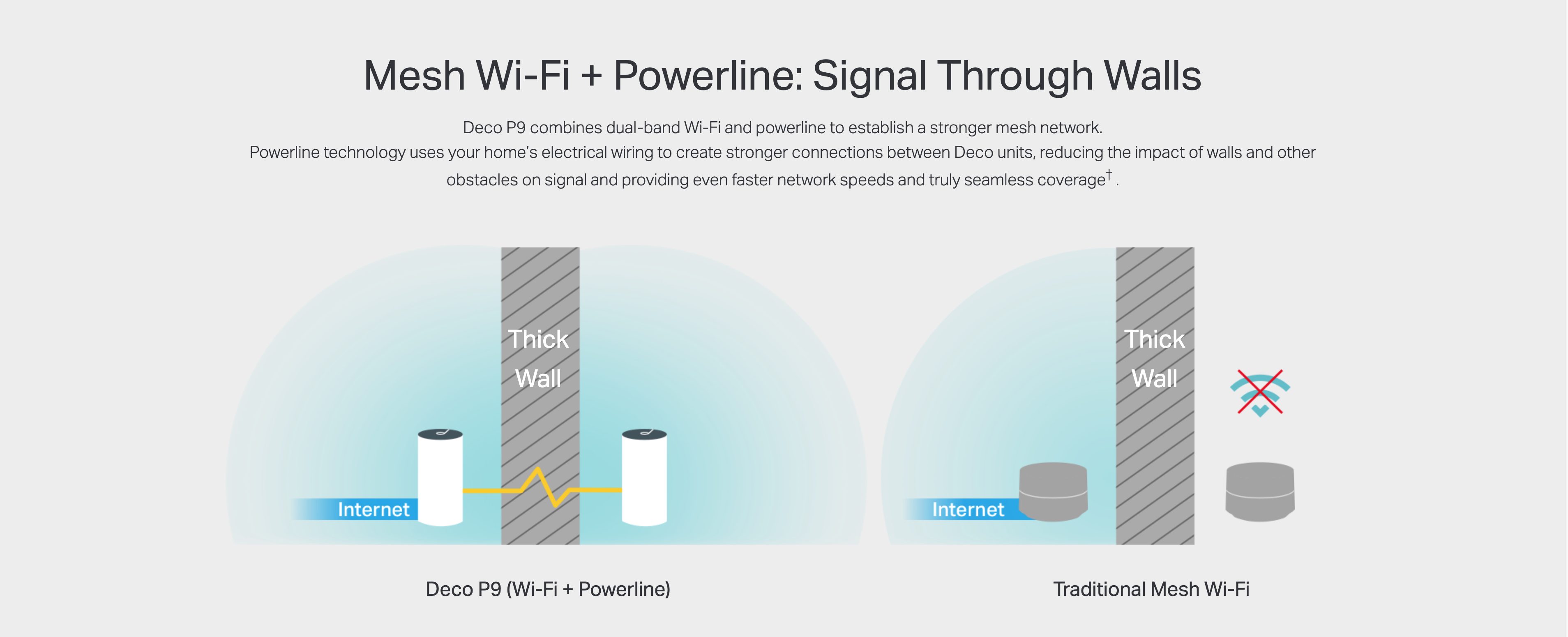
The Deco app also allows for parental controls, which will enable you to block specific websites or monitor particular devices, which may help determine which method takes the most bandwidth. You can even see when new devices login to your network.

The Deco supports 802.11 ac/n/a on the 5 GHz band with speeds up to 867 Mbps. While 802.11 b/g/n 2.4 GHz with speeds up to 400 Mbps at 2.4 GHz.

While testing the Deco, we were able to get above 170 Mbps, which is my internet speed right now. Our test showed that the Decos speed was 1200 Mbps write &4100 Mbps read. Much higher than expected. These will be excellent speeds if you want to set up a home server.

Share
What do you think?
Happy0
Sad0
Love1
Surprise0
Cry0
Angry0
Dead0

WHAT'S HOT ❰

Apple Watch runners get a long-overdue Strava navigation upgrade
Lego Crocs collaboration launches with maximum confidence and zero restraint
HMD expands accessories lineup with Watch X1, Watch P1, and six Dub earbuds
Nothing Phone (3a) Community Edition: same soul, built by the fans
Microsoft issues second emergency Windows 11 update after outlook crashes
Absolute Geeks UAEAbsolute Geeks UAE
Follow US
© 2014 - 2026 Absolute Geeks, a TMT Labs L.L.C-FZ media network
Upgrade Your Brain Firmware
Receive updates, patches, and jokes you’ll pretend you understood.

No spam, just RAM for your brain.
Welcome Back!

Sign in to your account

Username or Email Address
Password

Lost your password?