TL;DR: Ocean turns Gmail from a chaotic inbox into a manageable workspace by sorting emails in ways that feel human, turning them into actionable tasks, and baking in a meeting scheduler that doesn’t make you cringe. The one-time payment model is a refreshing break from subscription fatigue, though Android users and those craving flawless AI parsing might want to hold off for a few more updates.
Ocean
If my Gmail inbox were a movie set, it would be The Day After Tomorrow: a sprawling wasteland of snowdrifts (unread messages), overturned cars (archived-but-not-dealt-with threads), and panicked survivors (the five or six emails I actually respond to on time).
Like a lot of people who’ve been online long enough to remember when Hotmail addresses were considered cool, I have lived through multiple “reinventions” of email. Every few years, some new startup promises to “fix the inbox,” to “make email work for you,” to “finally free you from email hell.” And every time, I try it, get excited, and then watch my inbox slowly morph back into a digital landfill.
Ocean caught my attention because it didn’t try to sell me on leaving Gmail. It didn’t give me that “let’s start over somewhere else” pitch. Instead, it whispered, “You keep Gmail. We’ll just… clean up the mess.” That’s a far more appealing proposition when you’ve got a decade’s worth of messages, filters, and labels baked into your workflow.
For the past week, I’ve been using Ocean every single day on my iPhone — in the morning over coffee, between meetings, and at night when I do my doomed attempt at inbox zero before bed. Here’s what I found.
Triage That Feels Like Therapy for My Inbox
The first thing that made me sit up and go, Okay, this is different, was Ocean’s triage system. Not “filters” in the Gmail sense, where you set rules once and hope they work forever. This is real-time, context-aware sorting that actually feels like it understands the types of email I get.
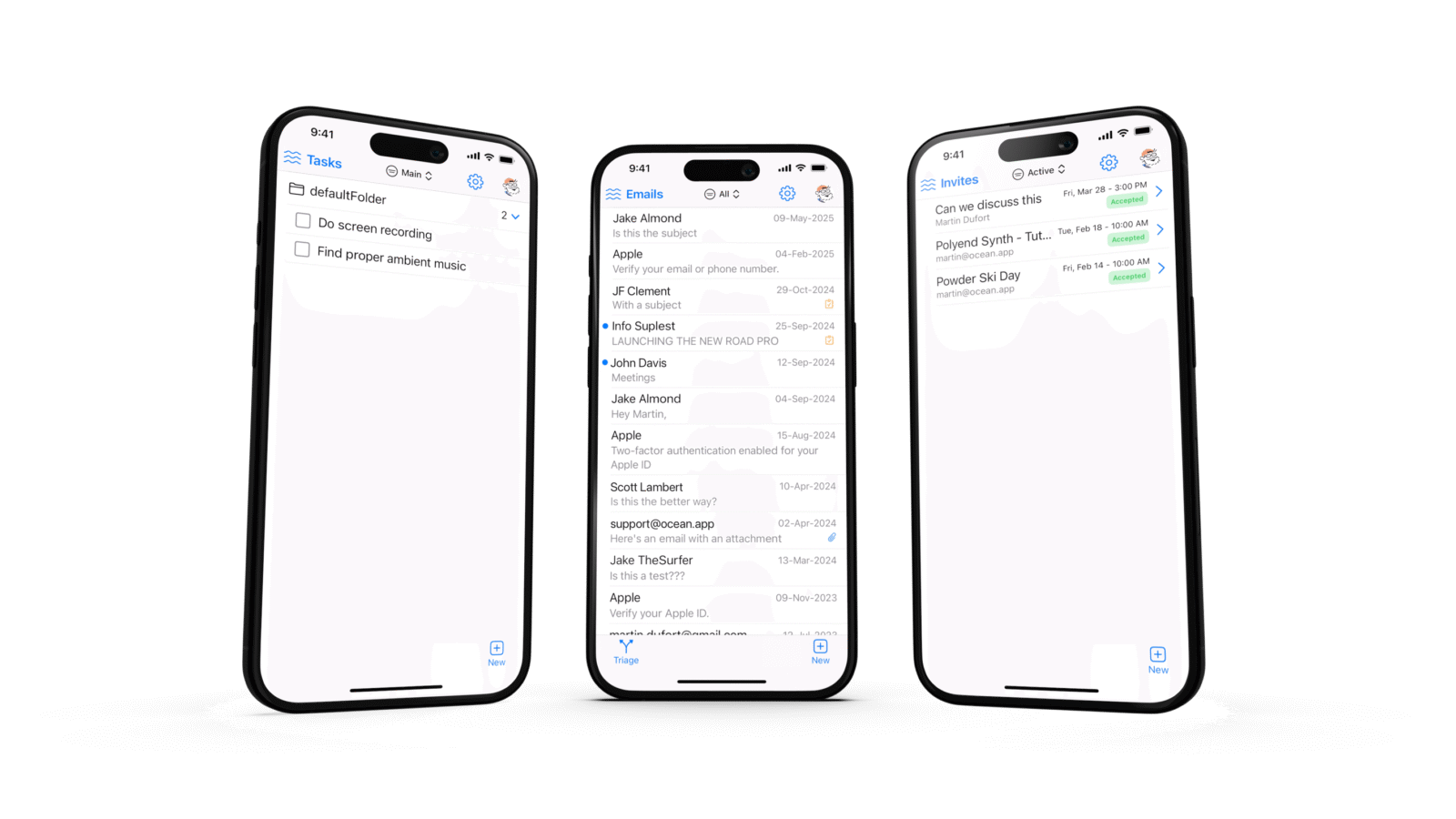
When I opened Ocean for the first time, my inbox wasn’t just the usual overwhelming wall of messages. Instead, it was broken into these oddly human-sounding categories: people who had emailed me for the very first time, people who email me all the time like it’s their part-time job, and people I actually know in my contacts. The “first-timers” view was a revelation. I didn’t have to wade through newsletters, automated alerts, and “just checking in” pings to see if someone genuinely new — maybe a potential client or a long-lost friend — had reached out.
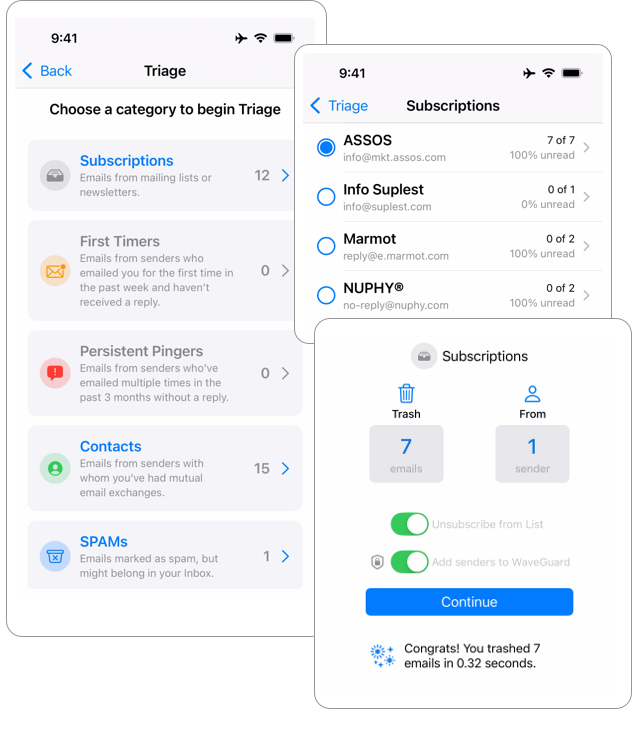
The “persistent pingers” category was hilarious and slightly mortifying. It turns out I have about six people in my life who will send three separate emails in the space of an afternoon rather than just one concise message. Having them corralled into a single view let me deal with them in batches, which somehow made the whole thing less irritating.
And then there’s the “spam-but-not-really” section. This is where Ocean proves it’s paying attention in ways Gmail sometimes doesn’t. It pulled a couple of surprisingly important things out of my spam folder — including a legitimate press invite that Gmail had banished alongside a scam about inheriting a gold mine. I still don’t know exactly how Ocean’s filter works, but it’s like having a friend who checks your mail slot and says, “Hey, this one looks like junk, but you might want to read it just in case.”
Turning Emails Into Tasks Without Losing the Plot
My relationship with task managers is a string of messy breakups. I fall in love with a new one, I move my whole workflow into it, and then I get tired of manually copying and pasting every little “to-do” from my inbox into it. Inevitably, I just stop using it, and my inbox becomes my accidental to-do list again.
Ocean cuts out the middleman. When an email contains something I actually have to do, I can just hit the “Create Task” button, and it’s instantly turned into a proper, trackable task — complete with a due date, rich-text notes, and a direct link back to the original email. There’s no copying. No “I’ll log this later” lie I tell myself.
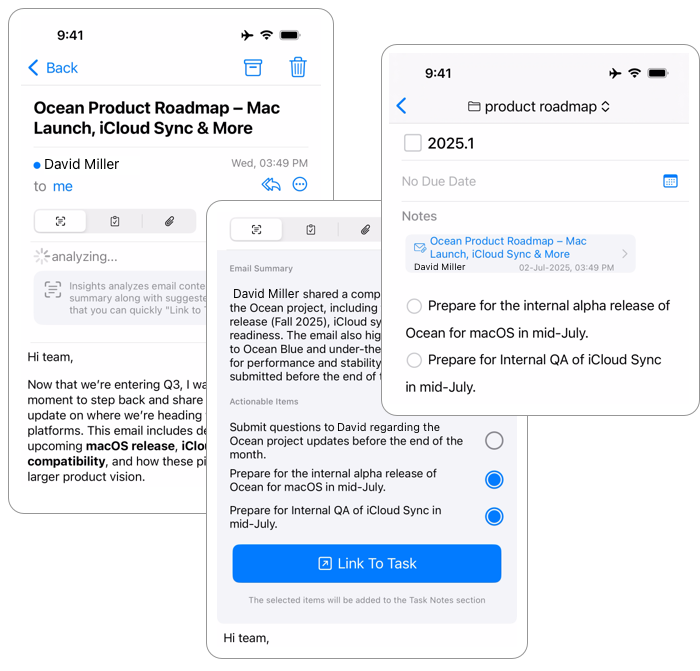
The AI-powered “extract action items” button has been a pleasant surprise. I tested it on some of my worst offenders: long, rambling work emails where the actual requests are buried under layers of pleasantries, background info, and unrelated tangents. Ocean was able to pick out the majority of the actual action points — things like “update the slide deck by Thursday” or “send over the final draft for review.” It even caught one particularly subtle request in a client email that I would have probably glossed over if I hadn’t seen it pop up in the task list.
That said, it’s not flawless. In some cases, especially when the request was more implied than stated, it just didn’t catch it. Still, even getting 80% of the asks right is a game-changer compared to me rereading the same email three times and still forgetting something.
Scheduling Without Selling Your Soul to Calendly
There’s a special place in my heart for tools that make scheduling less painful. I’ve tried them all — from the brutalist approach of “here’s my calendar, pick a time” to the full AI assistant experience that pretends to negotiate on my behalf. Most of them either feel too impersonal or too much like I’m making the other person do the work.
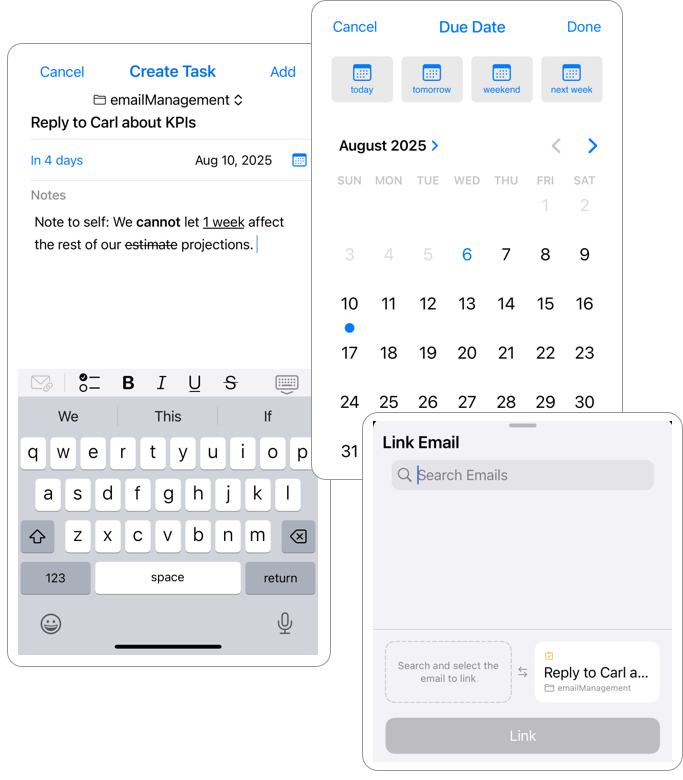
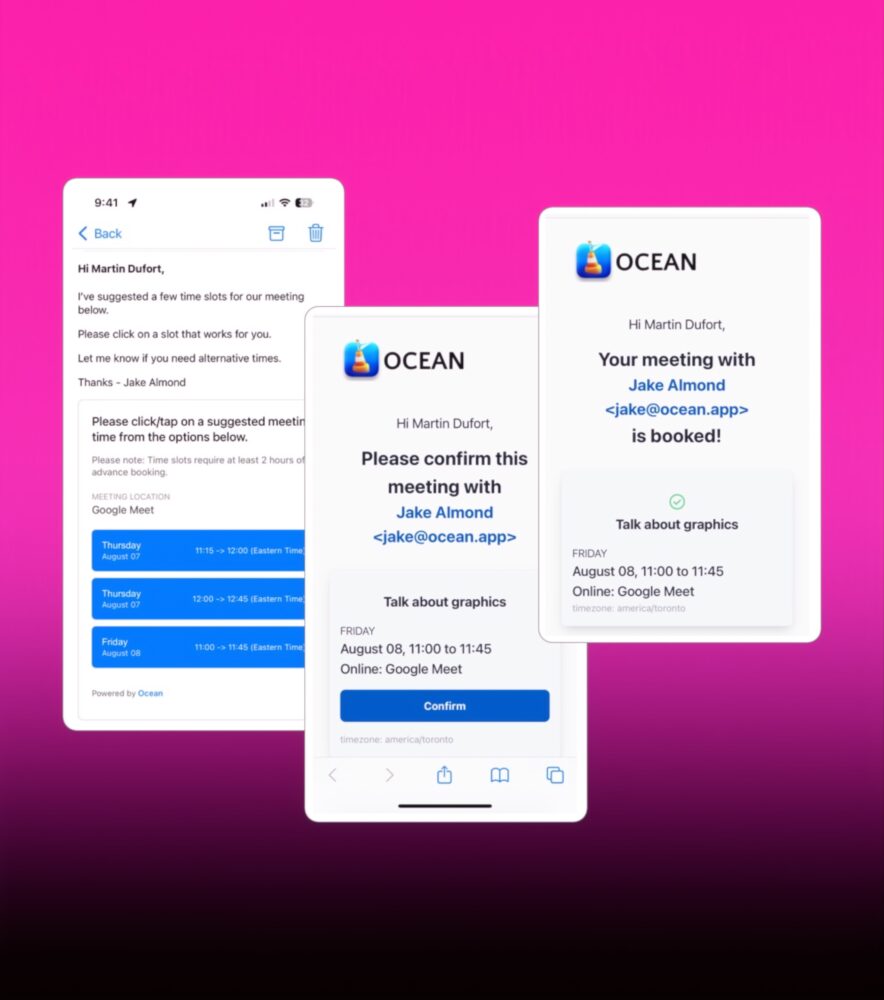
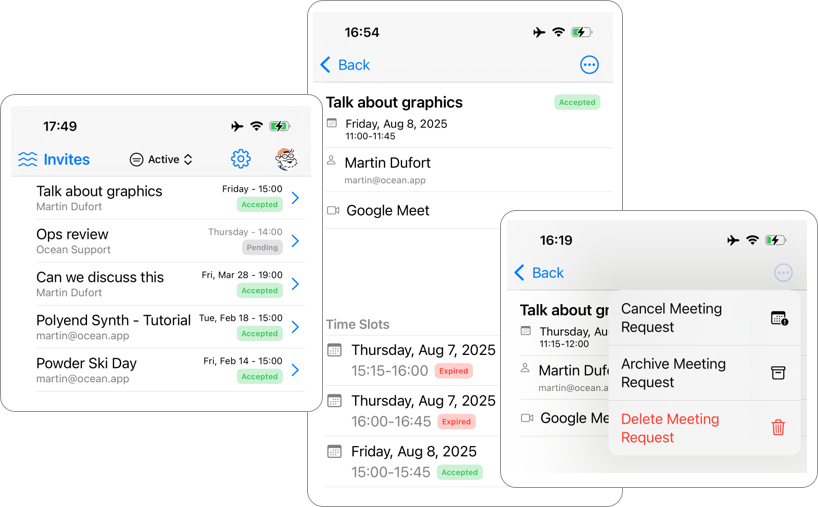
Ocean’s built-in scheduling feature is… nice. And I mean that in the way you’d describe a chair that’s actually comfortable. It’s not flashy. It’s not overengineered. You set your availability based on your existing calendar, you send an invite link, and the recipient picks a time. You can set rules to avoid last-minute bookings (a lifesaver for people like me who need at least an hour’s notice before talking to another human), and once someone books, it just shows up in your calendar.
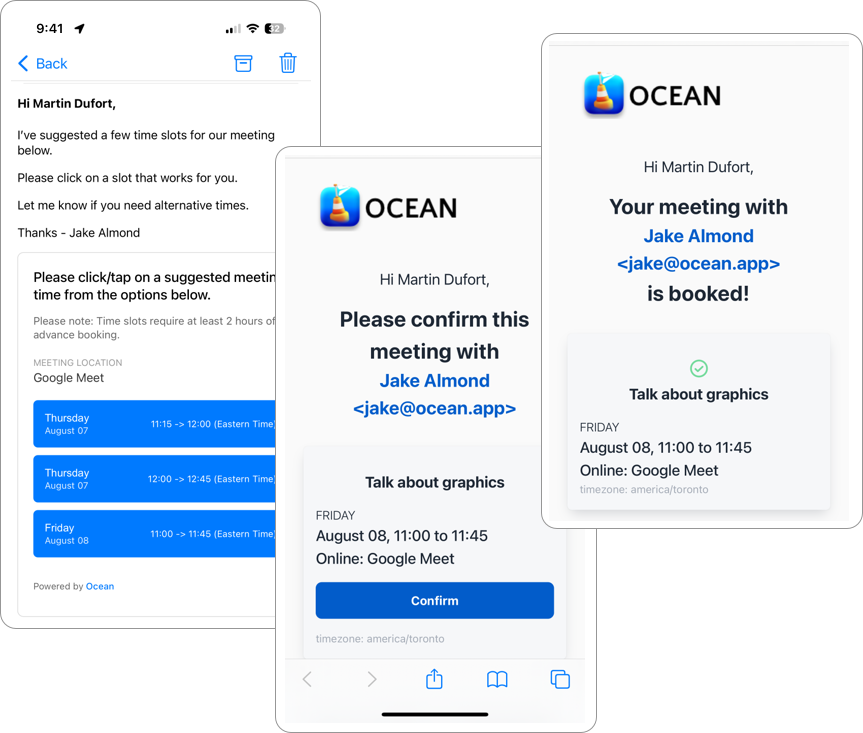
The real magic is that it’s inside the same app where you’re managing your email. No extra tabs, no switching between apps, no “hang on, let me check my other calendar.” It just feels… integrated. I’ve already cut down the usual three-email dance it takes to lock down a meeting to a single step.
The Pricing Twist
In 2025, the subscription fatigue is real. Everything wants to be $7 a month now. My grocery list app wants a subscription. My note-taking app wants a subscription. My note-taking app’s font wants a subscription.
Ocean’s pricing model is almost quaint: $67 gets you a year of updates and premium features. You pay it once, and you’re done. There’s a free tier that’s perfectly usable if you’re just testing the waters, and there’s even a 14-day trial for the premium stuff that doesn’t sneakily auto-renew at the end.
It’s not quite “buy it once and own it forever,” but it’s close enough to feel refreshing. And it puts the pressure on Ocean to actually deliver new features worth paying for each year — something I wish more companies would commit to.
Where It Still Needs Work
Ocean is still young, and it shows in a few places. The lack of an Android app means I can’t fully commit to it as my all-day, every-device email client. The AI action item extraction, while good, still misses the subtler “could you maybe…” type asks. And while the iPhone app is smooth, I’m itching for the promised Mac app, ideally with a full suite of keyboard shortcuts so I can channel my inner Superhuman power user.
But these feel less like dealbreakers and more like “come back in six months and this will probably be fixed” kind of problems.
Final Verdict
Ocean isn’t a revolution in email, but it is a thoughtful, genuinely helpful upgrade for Gmail users who want to actually do something with their inbox instead of just surviving it. The triage categories alone make it worth a try, the task integration is smooth, and the scheduling tool is a hidden gem. It’s the rare email app that doesn’t try to be your whole life — just the part that makes the rest of your digital life less of a mess.