
TL;DR: 1Password’s built-in phishing protection is effective because it intervenes at the precise moment phishing actually succeeds: when credentials are about to be shared. In an environment where 89% of people have encountered phishing and 61% have fallen for it, the feature doesn’t rely on detection accuracy, memory, or ideal user behavior. Instead, it introduces a carefully timed interruption at the point of irreversible action. The result is a security feature that feels calm, human, and deeply intentional—especially in professional environments where urgency, repetition, and access multiply risk.
1Password’s built-in Phishing Protection
Reviewing a Feature That Knows Exactly What It Is Responsible For
Security products often fail because they don’t know where their responsibility ends. They attempt to guard everything, warn about everything, and respond to everything, which eventually means they are trusted for nothing.
1Password’s phishing protection is notable because it makes a clear, disciplined choice about scope. It does not attempt to detect phishing messages. It does not scan inboxes or analyze page layouts. It does not classify websites or claim to identify malicious intent. Those are hard problems, and they’re problems other tools already attempt to solve with mixed results.
Instead, this feature asks a narrower, more honest question: what is the one thing a password manager is uniquely qualified to know, and how can it act on that knowledge at the right time?
The answer is credentials. Where they belong. Where they don’t. And what happens when a user is about to move them.
That framing alone puts this feature on different footing than most phishing defenses.
The Real Failure Point This Feature Targets
Phishing defenses tend to cluster around entry points: email gateways, spam filters, browser warnings. Those systems are designed to stop bad things from arriving. But phishing rarely succeeds because those systems fail completely. It succeeds because something slips through just enough to look legitimate in context.
The critical failure point isn’t awareness. Most people know phishing exists. The failure point is action under pressure.
When someone is busy, distracted, or responding to something that feels urgent, their behavior changes. They stop evaluating and start completing. And when they reach a login form that looks right, the act of entering credentials feels like routine, not risk.
Historically, password managers bowed out at that moment. Autofill wouldn’t trigger, but the system provided no explanation that matched the user’s mental model. Under urgency, the simplest explanation is often assumed: the tool didn’t work. And so users compensate by pasting manually.
That paste action is the moment phishing actually wins.
1Password’s phishing protection exists because that moment was left unguarded for too long.
The Autofill Refusal: Necessary but Incomplete
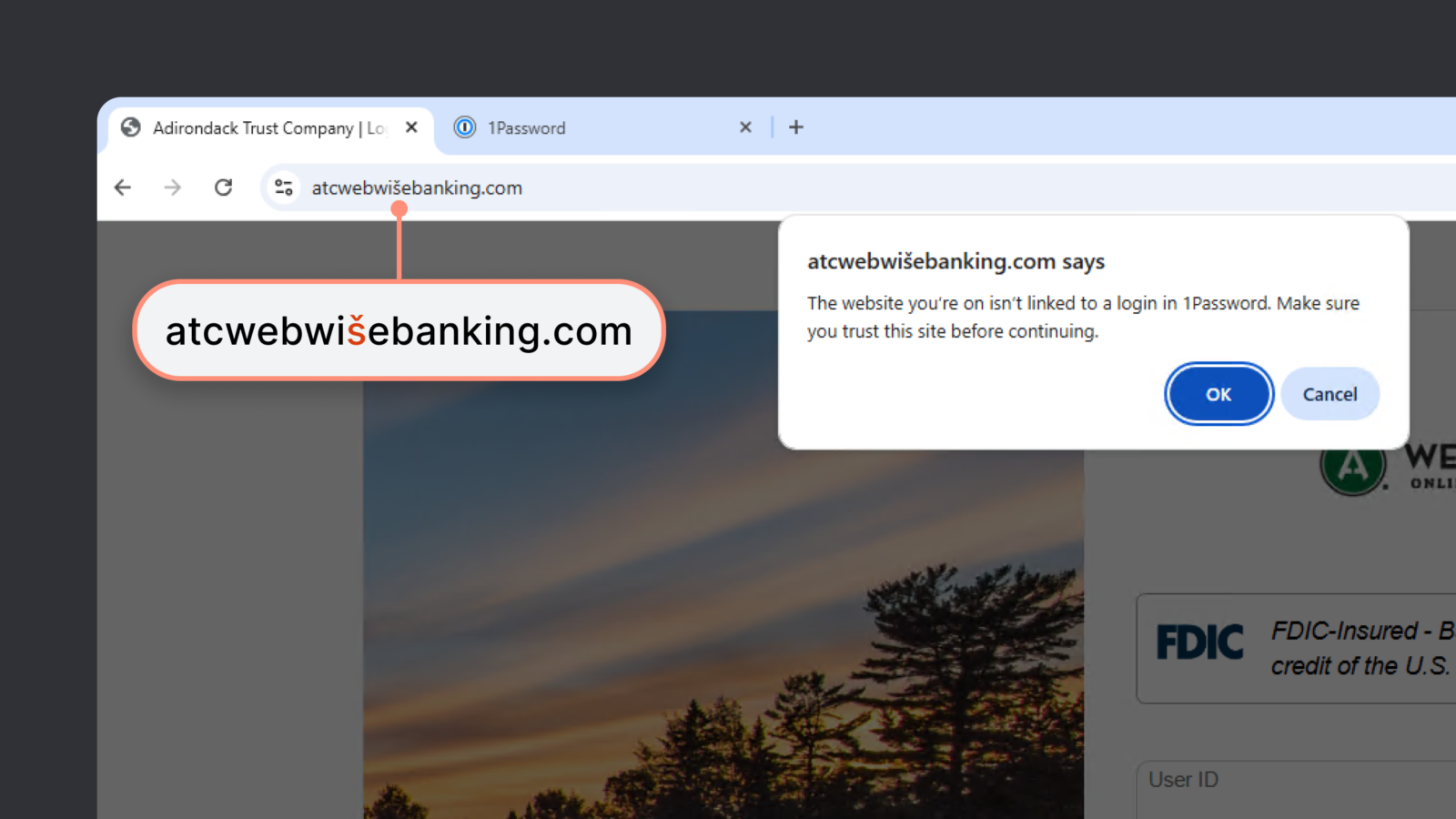
Autofill refusal is a strong defense, but it has an important weakness: silence.
When autofill doesn’t engage, users are left to infer why. And in real-world conditions, inference is shaped by stress, time pressure, and habit. A user who pastes credentials manually isn’t usually making a conscious decision to override security. They’re trying to move forward.
1Password recognized that autofill refusal alone assumes too much cognitive bandwidth. It assumes users will stop, question, inspect, and verify. That assumption doesn’t hold when inboxes are full and deadlines are close.
The phishing protection feature doesn’t replace autofill refusal. It completes it.
The Paste Moment: Where the Feature Lives
The defining decision behind this feature is where it activates.
It does not appear when the page loads. It does not appear when the URL is clicked. It does not appear as a persistent banner or warning. It waits.
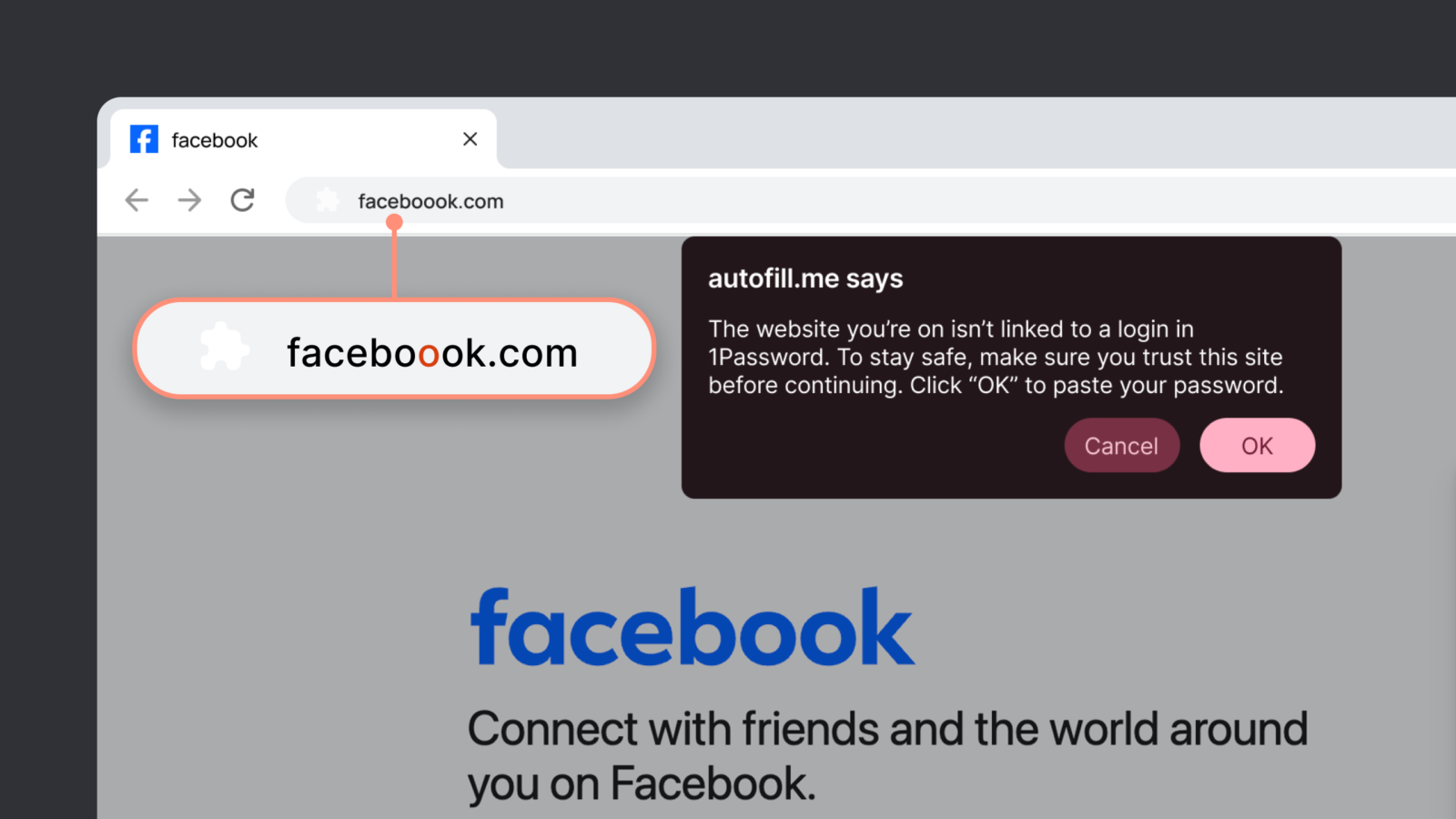
Only when the user initiates a paste action—only when credentials are about to cross from vault to browser—does the feature engage.
That timing is not incidental. It aligns the warning with user intent. The system doesn’t interrupt curiosity or navigation. It interrupts commitment.
At that moment, the browser extension presents a warning stating that the site does not match the saved login being used and encourages the user to pause and verify before proceeding.
The wording is restrained. Informational. There is no implication of wrongdoing, no sense of failure, no suggestion that the user has already made a mistake.
The system intervenes, but it does not seize control.
Why Not Blocking Is the Correct Choice
It would have been easy to block the action outright. From a pure security standpoint, blocking feels clean. If credentials don’t belong, don’t allow the paste.
But blocking creates a different kind of risk: user resentment and workarounds. When people feel prevented rather than assisted, they look for ways around the control. That’s how security tools get disabled, bypassed, or ignored.
By allowing the action to proceed after the warning, 1Password preserves user agency while still introducing friction at the exact moment where friction is helpful.
The pause is the protection.
That distinction is subtle, but it’s the difference between a tool users tolerate and a tool users trust.
How the Feature Trains Without Teaching
Traditional security training relies on memory. It asks users to recall rules under stress. That’s a losing strategy.
This feature trains behavior through repetition and context. Each time it appears, it reinforces a simple association: paste warning equals mismatch. Over time, that association becomes automatic.
Users don’t need to remember phishing checklists. They don’t need to hover over URLs. They don’t need to analyze page structure. The system surfaces the relevant information at the moment of action.
That’s not education. That’s conditioning. And in security, conditioning works better.
Why the Numbers Matter to This Design
The data behind this feature gives it weight. When 89% of people have encountered phishing and 61% have fallen for it, the problem isn’t edge cases. It’s everyday behavior.
Only about a quarter of people check URLs before clicking. That makes URL-based vigilance an unreliable defense. Designing a feature that depends on users noticing subtle domain differences would be irresponsible.
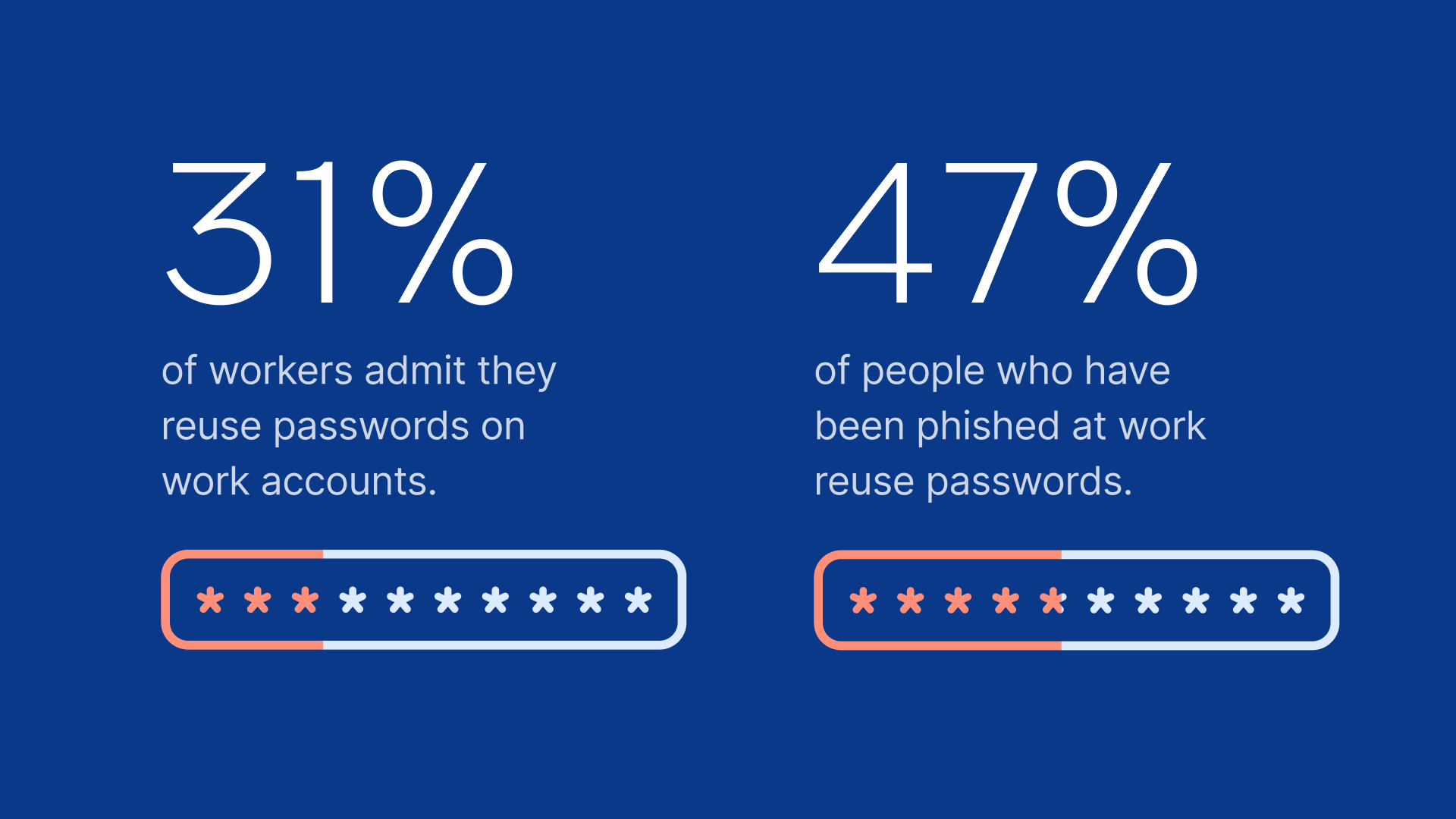
At work, the situation worsens. Working individuals are more likely to have been phished than non-workers, not because they’re less careful, but because they’re exposed to more messages, more logins, and more urgency.
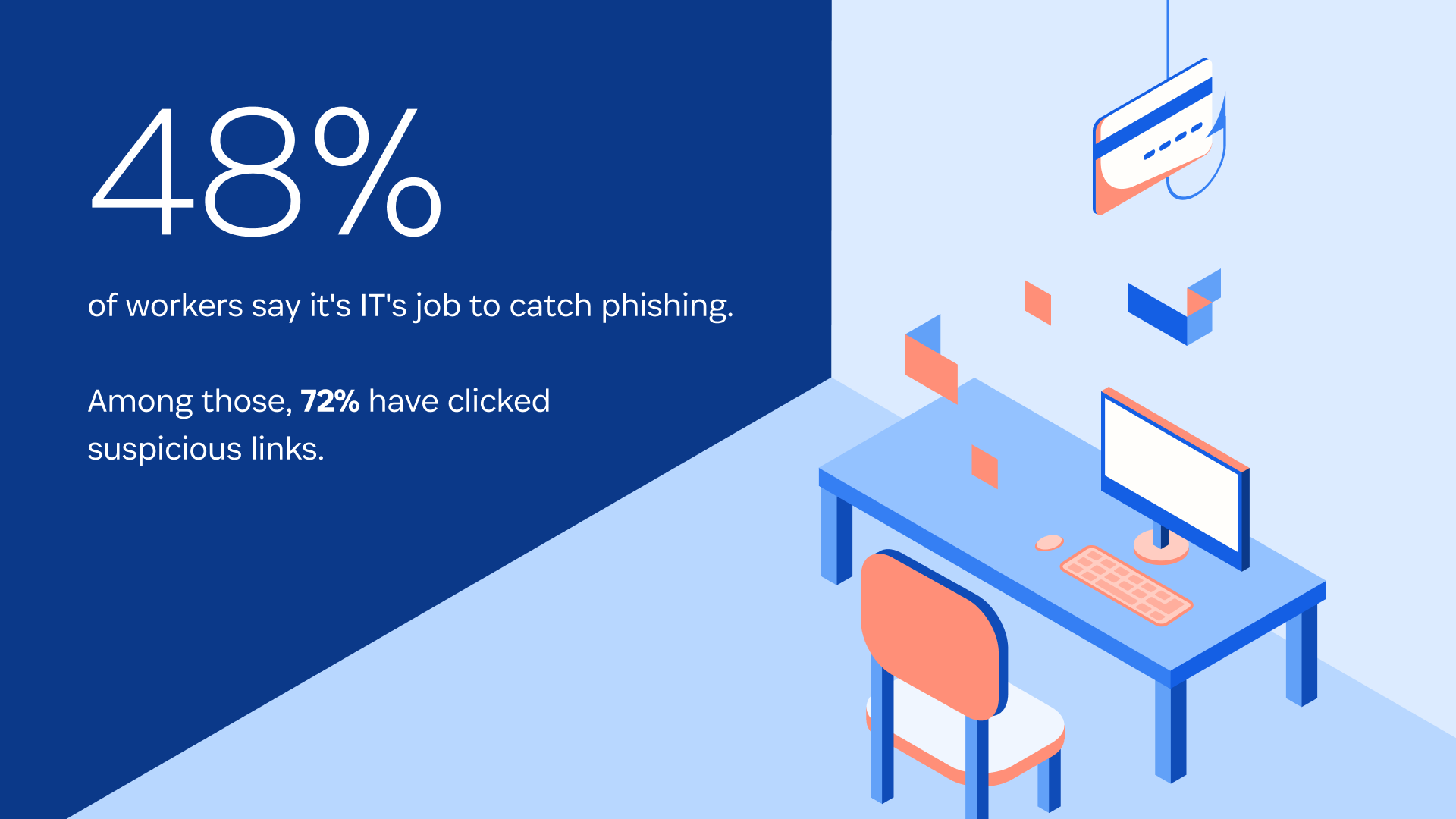
When nearly half of workers believe phishing is primarily IT’s responsibility—and those same workers are significantly more likely to click suspicious links—it becomes clear that externalizing security erodes vigilance.
1Password’s phishing protection quietly counters that without lectures or mandates. It reintroduces responsibility at the moment where it matters, without blame.
Credential-Centric Protection in Enterprise Contexts
In professional environments, phishing is rarely about immediate theft. It’s about access. Credentials unlock systems, data, and lateral movement across an organization.
Because this feature operates purely at the credential level, it scales cleanly across environments. It doesn’t need to understand internal tools, branding, or workflows. It simply enforces consistency between credentials and destinations.
That makes it especially effective in complex organizations where employees juggle dozens of services daily. The more fragmented the environment, the more valuable this kind of invariant becomes.
Living With the Feature Over Time
The true test of a security feature isn’t how impressive it looks in a demo. It’s how it behaves on an ordinary Tuesday.
Most of the time, this feature is invisible. That’s intentional. When it does appear, it doesn’t derail work or demand attention beyond what’s necessary. It doesn’t create alarm fatigue because it only triggers when something materially risky is about to happen.
Over weeks of use, it feels less like a warning system and more like a quiet co-pilot—one that speaks only when silence would be costly.
What This Feature Refuses to Pretend
It doesn’t claim to eliminate phishing.
It doesn’t assume perfect users.
It doesn’t replace layered defenses.
It doesn’t promise safety through enforcement.
It promises awareness at the moment of action.
That restraint is rare, and it’s why the feature works.
Final Verdict: Security That Acts at the Speed of Humans
1Password’s built-in phishing protection is not impressive because it is complex. It is impressive because it is precise.
By choosing the paste moment as its intervention point, by refusing to block or blame, and by grounding its design in real human behavior supported by real data, 1Password has delivered a feature that feels mature, thoughtful, and genuinely useful.
It doesn’t try to win the phishing arms race.
It quietly makes phishing harder to succeed.
And in the real world, that’s what matters.