

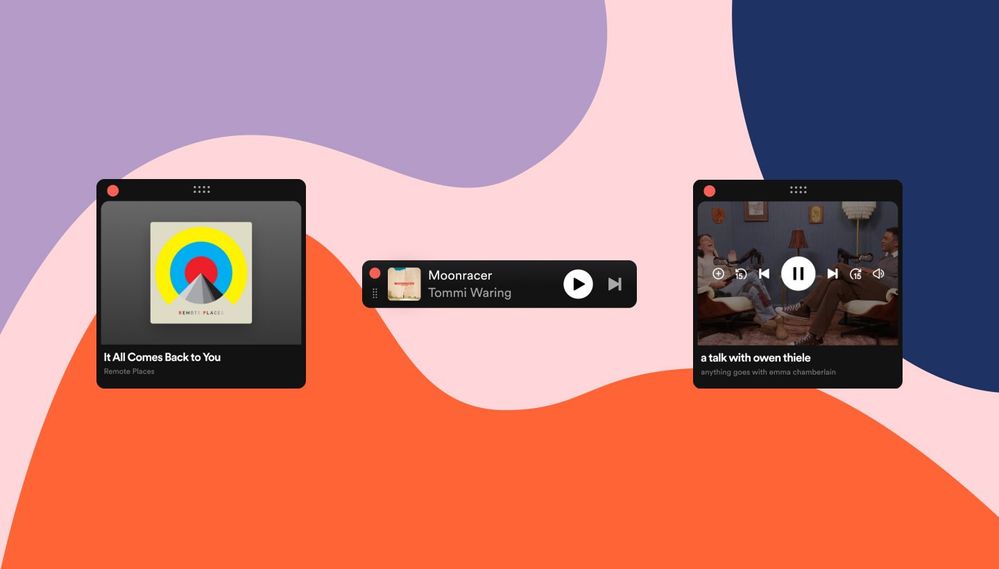
Ever get stuck in that loop where you’re jamming to your Spotify playlist, but need to adjust the volume or skip a track? Just the thought of switching windows and interrupting your flow can be enough to break your concentration. Spotify has introduced Miniplayer: a great way for multitaskers who love to keep the music going. Think of it as a tiny, customizable command center that sits right on your desktop, giving you instant access to all the essential music controls without ever derailing your workflow.
What You’ll Love:
- Music & Podcasts Covered: Whether you’re rocking out or catching up on a podcast, Miniplayer has you covered. Even video podcasts pop out in a resizable window!
- Stay Focused: Miniplayer floats neatly over your other apps. No more distractions or losing your groove when you change a track.
- Seamless Switching: Need the full Spotify experience? Miniplayer opens and closes without missing a beat.
- No More Playlist Distraction: Shuffle, repeat, or even save a track without getting sucked into browsing mode.
- Make It Yours: Square, rectangle, or tiny bar – Miniplayer fits your workflow. Close the main window and still command your tunes!
How I Use It:
In just few hours of use, the Miniplayer has become my go-to for streamlined music management. I keep it minimized in a corner, taking up minimal screen real estate. This way, I can see what’s playing at a glance and easily pause, skip tracks, or adjust the volume with a click. When inspiration strikes and I want to jump into the full Spotify experience, it’s just a click away. Clicking the artist name, song title, or album art instantly launches the full app.
The Miniplayer is being released on a rolling basis. You might not see it immediately, but keep an eye out – it should appear in your Spotify app soon.
