Google has released a native Gemini app for Mac, addressing a long-standing gap that has limited the AI assistant’s usefulness on desktop compared with rivals like ChatGPT and Claude. The new application, available for macOS 15 and later—including on Intel-based Macs—brings more seamless integration into everyday workflows without forcing users to switch between browser tabs or manually upload files.
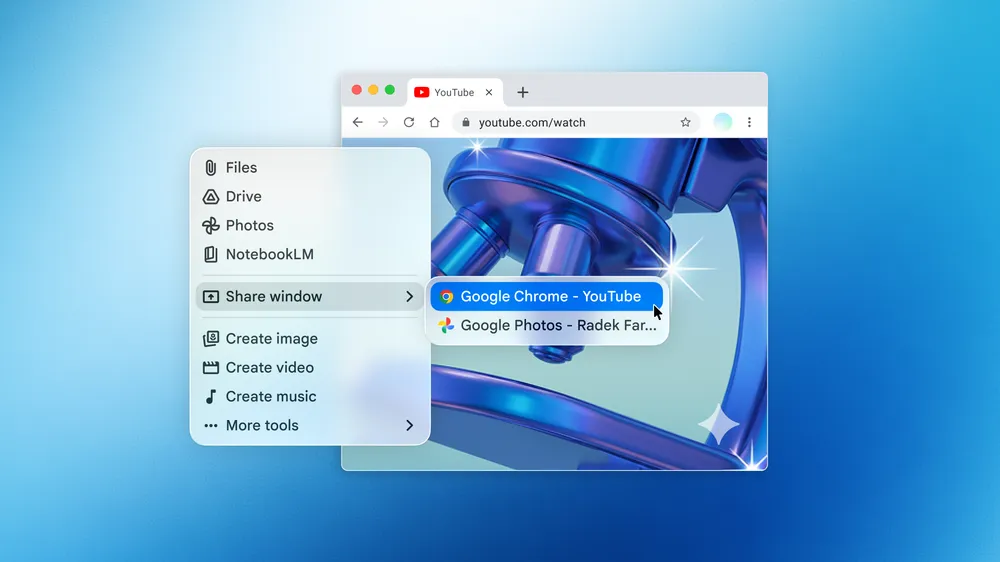
The most practical addition is the ability to share the current app window directly with Gemini, giving the model immediate visual context about what the user is working on. This should prove especially helpful for tasks involving locally stored documents, spreadsheets, or code that previously required tedious uploads to the web version. A quick keyboard shortcut—Option + Space—lets users summon the assistant from anywhere on the system, though users who already rely on the same shortcut for ChatGPT will need to reassign one of them.
Beyond screen sharing, the Mac app supports the full range of features already available in the browser version, including drafting emails and documents, summarizing long articles, brainstorming ideas, helping with coding tasks across multiple languages, and analyzing uploaded images. It can also generate images, videos, and music using Google’s Nano Banana and Veo models. Settings allow users to manage connected apps, set custom instructions, and toggle memory features on or off.
The initial version was reportedly built in just days using Google’s own AI-powered IDE called Antigravity, a detail that highlights how quickly internal tools are accelerating development cycles. Google has indicated that this launch is only the starting point, with plans to expand capabilities over time. For now, the app works with both free Google accounts and paid Gemini subscriptions, though advanced features require an AI Plus, Pro, or Ultra plan.
On paper, the move makes Gemini noticeably more competitive on the Mac platform, where desktop AI tools have gained traction for productivity and creative work. Still, the usefulness will ultimately depend on how reliably the screen-sharing and context features perform in real-world use, particularly with complex or sensitive files. Privacy-conscious users may also weigh the implications of granting an AI model visibility into their active windows and local content.
The arrival of a dedicated Mac app reflects the broader industry shift toward AI assistants that feel less like occasional web tools and more like persistent workspace companions. Google’s competitors have offered similar desktop experiences for longer, so this release feels more like catch-up than innovation. Whether it meaningfully narrows the gap in daily usefulness remains to be tested once users spend time with it beyond the initial novelty.
The Gemini Mac app can be downloaded directly from Google’s site. While it lowers some friction for Mac users, it also underscores how fragmented the AI landscape has become, with each major player racing to embed its assistant deeper into operating systems and workflows.