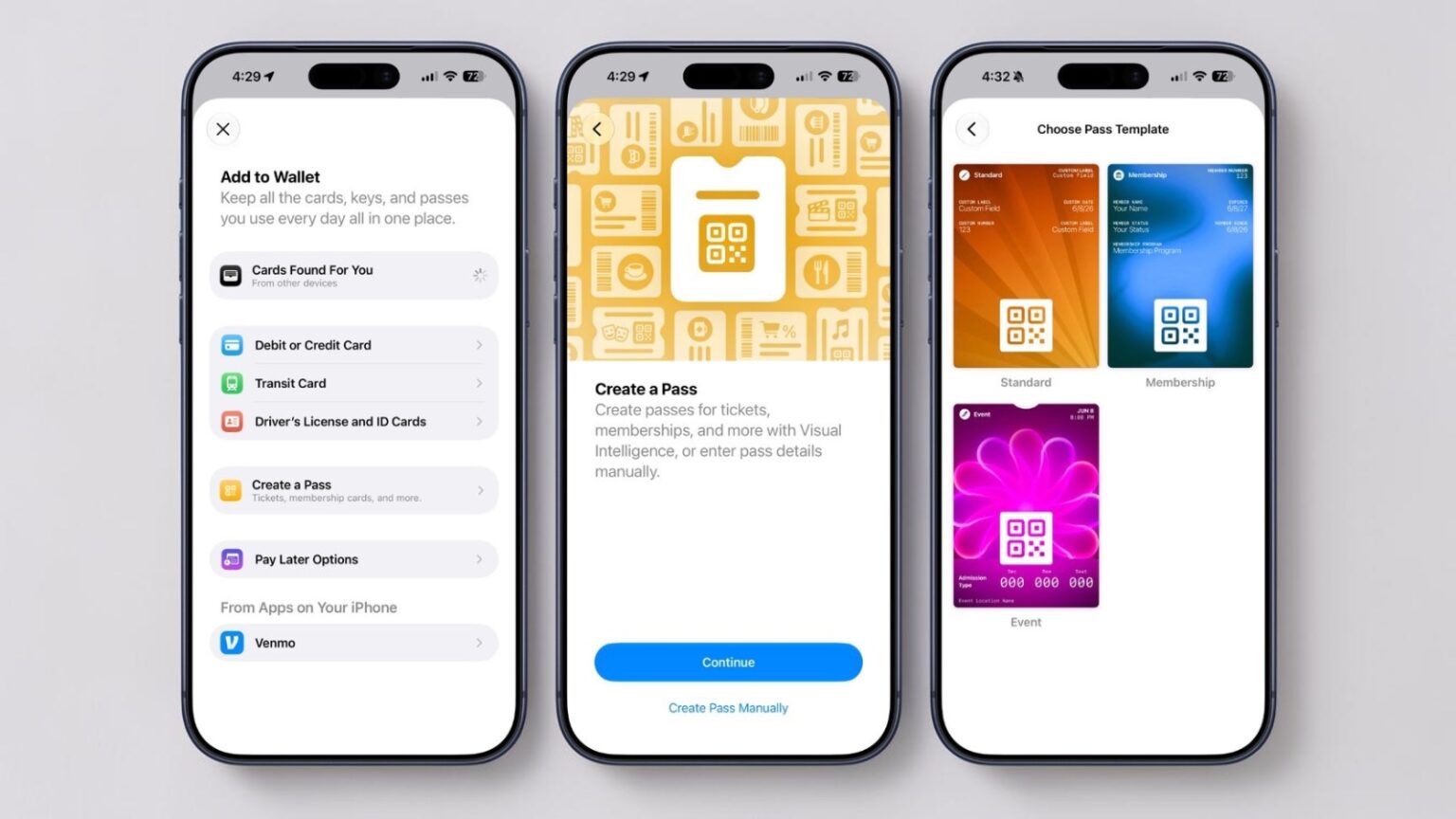
Apple has introduced a new “Create a Pass” feature in the Wallet app as part of iOS 27, allowing users to digitize physical tickets, memberships, and similar items more easily. The tool leverages Visual Intelligence to scan a physical pass and generate a digital version when an official one is unavailable, with a manual creation option available for greater control. This addition addresses a practical gap for many users who still carry assorted plastic cards and paper tickets, though its effectiveness will hinge on real-world acceptance at venues and stores.
The process offers Standard, Membership, and Event templates, each populated with relevant details such as name, location, admission type, and a scannable barcode or QR code captured via photo. Users can customize passes further by adding or removing fields like labels, dates, contact information, coupon codes, VIN numbers, or insurance details, providing flexibility for a wide range of physical cards. Background options include 12 preset colors or seven category-specific designs for theater, music, sports, and movies, giving a modest level of personalization without overcomplicating the interface.
This capability builds on the Wallet app’s existing role as a central hub for payments and passes, yet it echoes features already available in various third-party apps that have handled custom card digitization for years. The convenience of keeping everything in one place is clear, particularly for occasional users who dislike juggling multiple loyalty or membership programs. However, comments from early discussions highlight lingering questions about reliability: not every cashier or event scanner may readily accept a homemade digital pass, and support for certain barcode formats remains limited. Dynamic codes that change frequently, common in retail loyalty programs, are not directly addressed here, potentially requiring ongoing workarounds.
In broader context, Apple’s Wallet has gradually expanded beyond credit cards and transit passes, reflecting the slow shift toward digital wallets across the industry. Competitors on Android have offered similar scanning and customization tools for some time, often with fewer ecosystem restrictions but varying levels of polish and security. Apple’s implementation benefits from tight integration with Visual Intelligence and the existing Wallet framework, yet it stops short of more ambitious ideas like real-time API connections for updating codes automatically. Such enhancements could reduce friction further, but their absence suggests a cautious approach focused on stability and privacy over rapid feature expansion.
The feature fits into iOS 27’s pattern of practical, everyday improvements rather than flashy additions. For users managing multiple memberships or collecting event tickets, it could streamline daily carry, especially when combined with other Wallet enhancements like Smart Stack integration seen elsewhere in the update. Still, success depends on widespread adoption by businesses and reliable scanning in varied lighting or conditions—areas where digital wallets have historically faced occasional hurdles.
As developer testing progresses, this Wallet update may prove one of the more quietly useful changes in iOS 27, particularly for those transitioning away from physical clutter. It underscores Apple’s incremental focus on refining core utilities, though broader compatibility and format support would strengthen its appeal for power users.